
Artificial intelligence is becoming increasingly present in trading, but most AI tools have one major problem: they can reason beautifully, but they do not always see a trader’s real data. And without access to trades, statistics, notes, tags and decision history, any analysis remains too general.
A trader can ask a regular chatbot: “Why am I losing money?” — and receive a standard set of advice about discipline, risk management and emotional control. Formally, all of this is correct. Practically, it is not very useful. Because the AI does not know where exactly the trader is making mistakes: on which instruments, on which days, after which series of trades, in what emotional state and und er which market conditions.
This is exactly the problem Scope360 solves — a next-generation automated trading journal and AI-powered trading analytics platform where AI works not with abstract advice, but with the trader’s real history. The platform offers two approaches to AI trading analysis: an MCP connection to Claude or another external AI assistant, and the built-in Scope AI.
At first glance, they look similar: both allow you to ask questions about your trades and receive answers based on journal data. But in essence, they are different tools with different logic, different use cases and different levels of convenience for the trader.
Let’s break down how an MCP connection differs from Scope AI, when it is better to use each option, and why these solutions do not compete with each other, but complement one another.
What Is Scope360 and Why AI Analysis Matters for a Trader
Scope360 is a professional automated trading journal that helps traders collect, structure and analyze data about their trading. The journal stores trades, results, instruments, directions, entry and exit times, tags, notes, emotional states and other parameters.
Unlike a traditional trading journal, an AI trading journal does not simply store information. It helps traders understand their performance, identify recurring mistakes and turn raw trading data into practical insights.
The main value of such a journal is not simply to “store trade history.” A table with wins and losses can be created almost anywhere. The real task of a trading journal is to help the trader understand:
which strategies actually work;
where systematic mistakes appear;
which instruments produce the best results;
under which conditions the trader breaks the plan more often;
how emotions affect the final statistics;
what needs to be changed to improve trading efficiency.
Previously, for this kind of trading performance analysis, traders had to manually filter trades, build tables, calculate metrics and draw conclusions. This requires time, attention and, what is especially funny, honesty with oneself. And people in the market usually have a tense relationship with that.
AI changes this process. Now a trader can not only look at dashboards, but also ask questions to their journal in ordinary language.
For example:
“Which instruments do I lose the most money on?”“After which emotions do I break risk management more often?”“How has my trading changed over the past three months?”“Which mistakes repeat most often?”“Compare my long and short trades and show where the result is better.”
And this is where two options for working with AI appear: through an MCP connection and through Scope AI.
What Is an MCP Connection in Scope360
MCP, or Model Context Protocol, is an open standard that allows AI models to connect to external services and receive data from them according to clear rules.
To put it more simply, MCP is a bridge between an AI model and a specific platform. In the case of Scope360, this bridge allows Claude to access trading journal data and use it for analysis.
The Scope360 MCP connector gives an external AI model access to the necessary journal data when the user makes a request. This turns MCP into a flexible solution for traders who want to use their trading data outside the platform, for example inside Claude.
Without MCP, Claude is simply an intelligent conversation partner. It can explain theory, help with wording, discuss risk management and psychology. But it does not see your real trading.
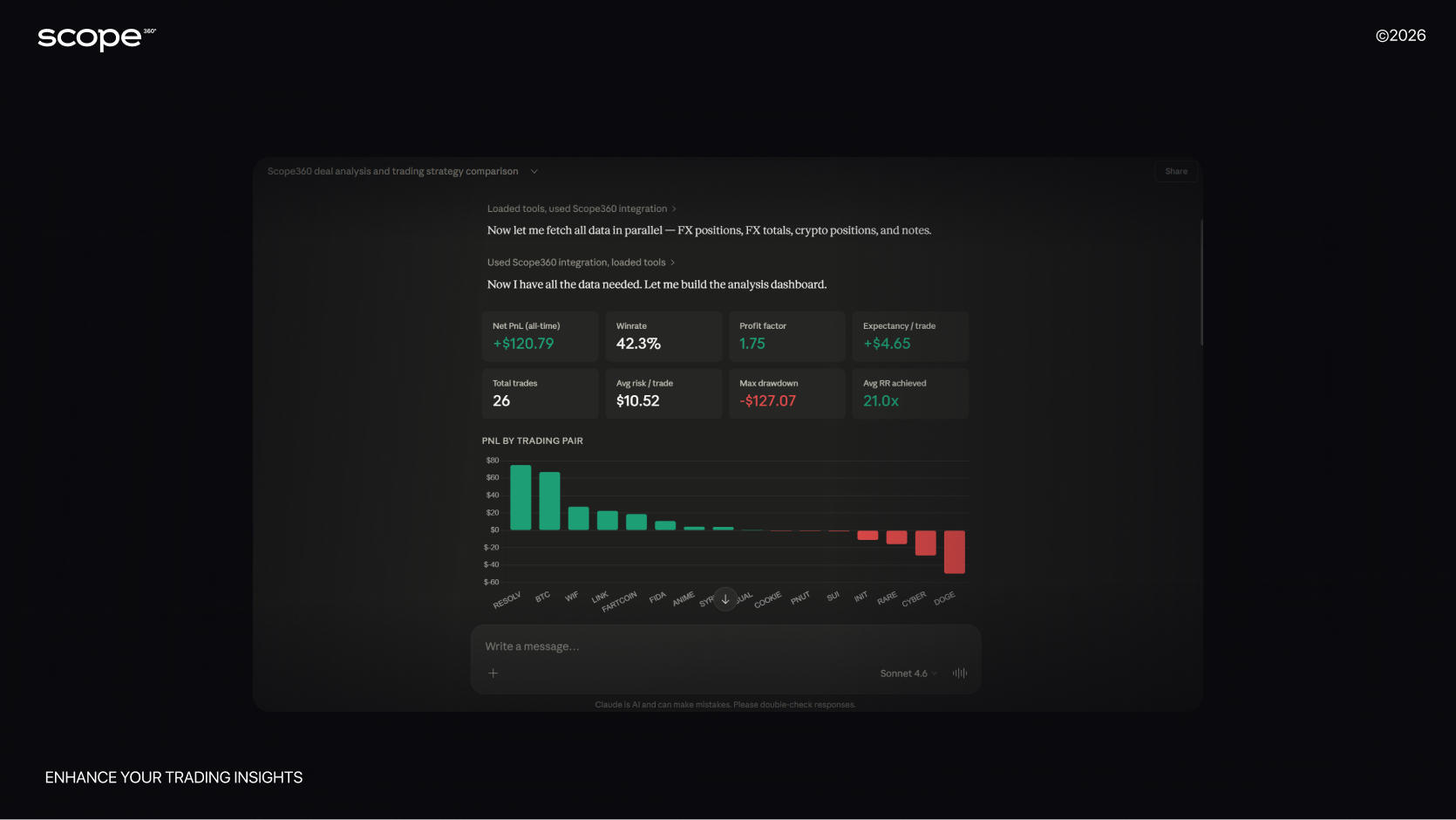
With MCP, the situation changes. Claude gets the ability to access Scope360 and analyze specific data from your journal: trades, results, statistics, tags and notes.
For example, a trader can write in Claude:
“Analyze my March trades based on the information in Scope360 and show which mistakes caused the main drawdown.”
Claude understands that it needs data from Scope360 to answer. It sends a request through the Claude MCP connector, receives the necessary information and forms a response in normal human language.
In other words, the MCP connection turns Claude from a universal AI assistant into an analyst that can work with your trading journal.
What Tasks Are Convenient to Solve Through an MCP Connection
An MCP connection is especially useful for those who already actively use Claude in their work. For example, if a trader uses Claude for analysis, note-taking, creating reports, preparing content or building trading hypotheses.
Through MCP, Scope360 data can be used in a broader workflow. This makes the MCP connection useful not only as a technical integration, but also as an AI trading analysis tool for traders who want more flexibility in how they work with their data.
For example:
1. Deep Analysis of Trading History
You can ask Claude to analyze trades over a specific period and find key changes in the trader’s behavior.
Example request:
“Compare my trading in January and February. What changed in my results, mistakes and discipline?”
2. Creating Personal Reports
Claude can use Scope360 data to prepare weekly, monthly or quarterly reports.
Example request:
“Create a report on my trading for the week: results, main mistakes, strengths and recommendations.”
3. Finding Hidden Patterns
AI can find recurring patterns that a trader does not notice manually.
For example:
worsening results after a series of profitable trades;
increased risk on certain days of the week;
weak statistics on specific instruments;
plan violations after emotional trades;
worsening entry quality during certain trading sessions.
This is especially useful for traders who want to analyze trading mistakes not through memory or emotions, but through real journal data.
4. Connecting Trading Analytics With Other Tasks
This is one of the main advantages of MCP. Claude can be used not only as an analyst, but also as a workspace.
For example, after analyzing trades, you can immediately ask:
“Based on these mistakes, create a work plan for next week.”
Or:
“Create a written report for my trading diary.”
Or:
“Create a short summary for my mentor based on the week’s results.”
MCP gives more flexibility because Scope360 data becomes part of a broader AI environment.
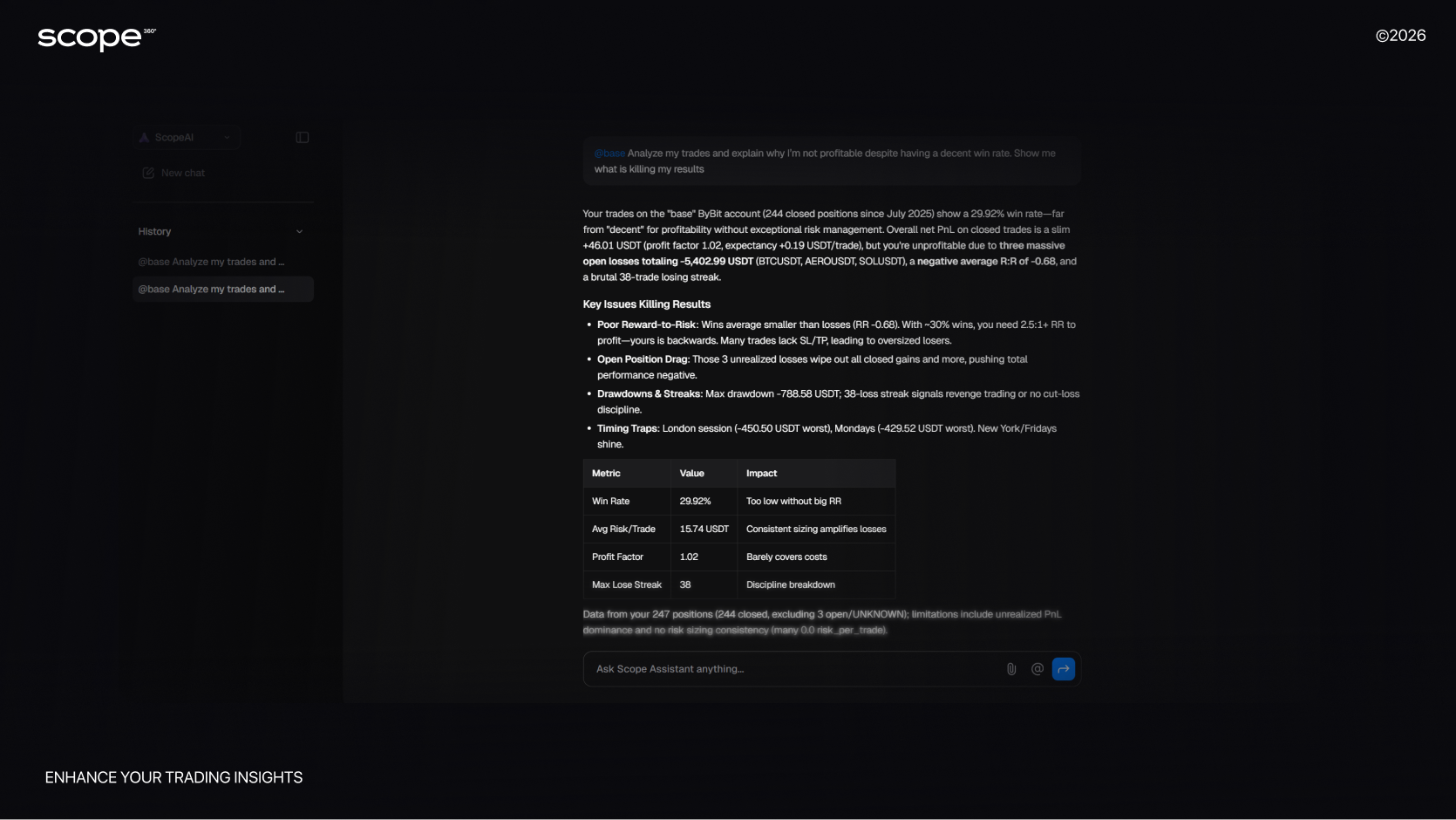
What Is Scope AI
Scope AI is an AI assistant built directly into the Scope360 platform. Unlike an MCP connection, the user does not need to go to Claude, configure an external connector or work through a third-party interface.
Scope AI is located directly inside the trading journal and was originally created for trading analysis.
It has access to the user’s data inside Scope360: trades, metrics, tags, notes, instruments, accounts, strategies and psychological markers. Thanks to this, Scope AI can answer questions not like a regular chatbot, but like a personal analyst of trading statistics.
In practice, Scope AI works as a built-in AI trading journal assistant. It helps traders analyze trades, compare strategies, identify weak points and understand trading behavior patterns without leaving the platform.
For example, a trader can open Scope AI and ask:
“Which mistakes most often lead me to losses?”
Or:
“Compare my results on BTC and ETH.”
Or:
“In which emotional state do I trade the worst?”
Scope AI analyzes the data inside the journal and returns a structured answer: with numbers, conclusions, observations and possible areas for improvement.
The Main Feature of Scope AI
The key advantage of Scope AI is simplicity.
The user does not need to think about the technical side of the connection. There is no need to open a third-party AI service. There is no need to manually export trades or copy data. Everything is already inside Scope360.
This makes Scope AI especially convenient for regular analysis and daily work with a trading journal with AI.
A trader can use it as a daily or weekly assistant:
quickly review the trading day;
understand the causes of a drawdown;
find recurring mistakes;
compare strategies;
check compliance with the trading plan;
assess the influence of emotions on the result;
prepare weekly conclusions.
Scope AI is not just a “chat with artificial intelligence.” It is a built-in AI trading journal assistant that works with the context of a specific trader.
This also makes it useful for trading psychology analysis, because the assistant can connect emotional tags, notes and behavioral patterns with actual trading results.
MCP and Scope AI: The Key Difference
The main difference between an MCP connection and Scope AI is where exactly the work with AI takes place.
An MCP connection allows you to use Scope360 data in an external AI service, for example Claude.
Scope AI allows you to analyze data directly inside the Scope360 platform.
That is, MCP answers the question:
“How do I connect my trading journal to an external AI model?”
And Scope AI answers the question:
“How do I quickly analyze my trades inside the journal itself?”
These are two different work scenarios.
MCP is about integration and flexibility.Scope AI is about speed, simplicity and native analysis inside the platform.
Comparison of MCP Connection and Scope AI
Criteria | MCP Connection | Scope AI |
|---|---|---|
Where it is used | In an external AI service, for example Claude | Inside the Scope360 platform |
Main task | To connect Scope360 data to an external AI model | To analyze trading directly in the journal |
Setup required | Yes, you need to connect the MCP connector | No, the tool is already built in |
Convenience for beginners | Requires a basic understanding of the connection | As simple as possible to use |
Flexibility of requests | Very high | High, but within Scope360 |
Best scenario | Deep analysis, reports, work in Claude | Fast daily trade analysis |
Data | Retrieved from Scope360 upon request | Used inside Scope360 |
Who it is suitable for | Those who already work with Claude | All Scope360 users |
Both options are part of the same broader idea: Scope360 is not just a place to store trades, but a platform for AI trading analysis and performance improvement.
When It Is Better to Use an MCP Connection
MCP is suitable for traders who want to use Claude as a full-fledged AI space for working with data.
This is a good option if you:
already actively use Claude;
want to build more complex analytical requests;
create detailed trading reports;
connect trading analysis with planning;
want to use Scope360 data in other work tasks;
like flexible prompts and non-standard analysis scenarios.
For example, MCP will be useful if you do not just want to know statistics, but want Claude to build a complete logic for improving your trading:
“Analyze my trades over the last three months, find the three main problems, explain their causes and create an improvement plan for the next four weeks.”
For such tasks, Claude through MCP can be a very powerful tool. It is especially useful when the goal is not just to check one metric, but to build a broader trading review, performance report or improvement plan based on real trading data.
When It Is Better to Use Scope AI
Scope AI is better suited for regular and fast work inside the trading journal.
This is the ideal option if you:
do not want to configure external connections;
want to receive answers directly in Scope360;
regularly analyze trades;
work with tags, notes and psychology;
want to quickly find mistakes;
use the journal as the main center of analysis.
For example, after a trading day, you can simply open Scope AI and ask:
“Analyze my trades today. Where did I deviate from the plan?”
Or at the end of the week:
“Create a short report on my week: what worked, what got worse, which mistakes repeated.”
For a daily routine, Scope AI is more convenient because it is located in the same place as the data itself.
It is also the more natural choice for traders who want an AI-powered trading journal without additional setup, external tools or technical configuration.
Why MCP and Scope AI Do Not Compete
It is important to understand: an MCP connection and Scope AI do not replace each other. This is not a choice in the style of “one is good, the other is unnecessary.” Although humanity loves arranging battles even between phone chargers, here everything is simpler.
Both tools work around one idea: to give the trader the ability to analyze real data with AI.
The difference is only in the format.
Scope AI is a built-in analyst inside Scope360. It is convenient for quick questions, regular work and analysis without extra actions.
MCP is an external bridge to Claude. It is convenient for more flexible, broader and non-standard work with data.
You can use Scope AI for daily analysis, and MCP for large reports, deep reviews and working with Claude as a separate analytical environment.
Together, these tools turn Scope360 from a simple journal into a complete trading analytics platform for traders who want to understand their results through data rather than assumptions.
Example Questions for Scope AI and MCP
You can write any prompts and questions you want AI to answer.
Analyze my trades and explain why I am not making a profit despite having a high win rate. Show me what exactly is worsening my results.
Based on my trading data, tell me the harsh truth about my behavior and mistakes. What do I constantly do wrong?
If I strictly followed my trading rules, how would my results change? Compare my current results with a scenario based on the rules.
Identify the biggest mistake in my trading, the one that costs me the most, and quantify its impact.
These types of prompts are useful both for trading performance analysis and for understanding behavioral patterns that affect decision-making.
Everything depends on your imagination, curiosity and the quality of your completed journal.
After all, the more information there is in the journal, the more informative and accurate the AI answer will be.
Conclusion: Two AI Approaches for One Goal
An MCP connection and Scope AI solve one common task: they help the trader make decisions based on data, not feelings.
Scope AI makes AI analysis available directly inside Scope360. It is a fast and convenient way to ask questions to your trading journal and receive clear answers.
An MCP connection opens up the opportunity to work with Scope360 data through Claude. This is a more flexible scenario for those who want to use an external AI tool as a full-fledged analytical assistant.
In both cases, the trader gets the main advantage: the ability to see their mistakes, patterns and strengths not through the prism of emotions, but through real data.
And this is one of the most important steps in a trader’s development: to stop guessing why the result is not changing and start working with what is actually happening in trading.
Connect your account and start analysing your past trades with Scope360