How the new Model Context Protocol is changing the way we work with data, and why Scope360 can already communicate with Claude.
What is MCP – and what does the connector have to do with it?
Until recently, AI assistants and chatbots faced a fundamental problem: they were capable of sound reasoning, but operated in an information vacuum. Whenever fresh data from a specific application was required, developers had to write separate integrations and devise bespoke solutions in the form of bots or AI agents.
In November 2024, Anthropic unveiled the Model Context Protocol (MCP) — an open standard designed to address this challenge systematically. Just as USB standardised the connection of peripheral devices, the MCP establishes a common language for communication between AI models and external data sources.
MCP is not just an API wrapper. It is an architectural standard in which every service becomes a ‘tool’ with clear rules: what it can do, what it returns, and how to interact with it. An AI model calls a tool just as naturally as a person opens a browser tab.
An MCP connector is a server-side implementation of the protocol for a specific service. When Scope360 publishes its MCP connector, it is essentially saying: ‘I can respond to queries about trading transactions using this standard.’ Claude connects to this connector and gains direct access to the log data.
How does it work?
The MCP architecture comprises three components: the host (Claude), the client (an application within Claude) and the server (the Scope360 MCP connector). Communication takes place in real time via a secure protocol.
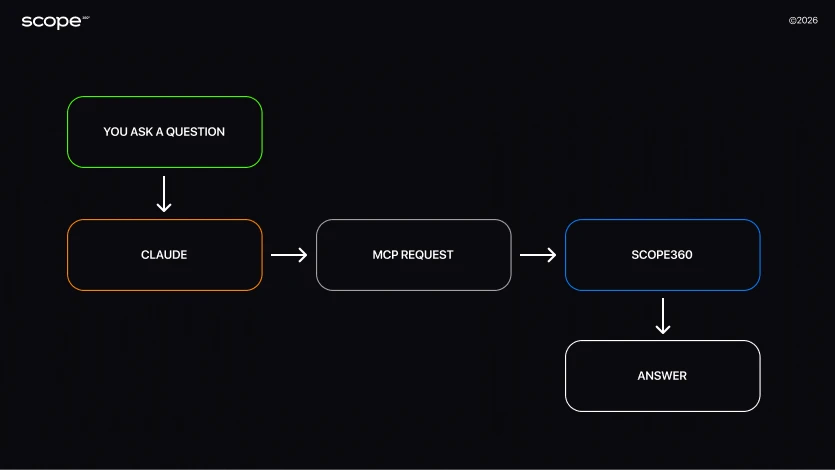
When you ask Claude a question about your trades, the model analyses the query and realises that it needs data from the trading log to provide an answer. It constructs a structured MCP query, sends it to the Scope360 server, receives the relevant records in return, and uses them to formulate a response.
Important: Claude does not store your data. Every request is point-specific, isolated and secure. Scope360 only provides the information requested by the model, and only at the time of the request.
From the user’s perspective, it’s simple: you ask a question in everyday language, and Claude finds the answer in your real-world data. Behind the scenes, there’s a whole system of tool calls, schema parsing and context management, but in this case, we’re interested in the result itself, not how it’s achieved.
What opportunities does MCP integration offer?
Before the arrival of MCP, the AI assistant was a smart conversational partner with no memory of your past interactions and, crucially, no specific source for that data. With the connector activated, the picture changes radically — Claude becomes an analyst who knows everything about your trading.
Let us list the fundamentally new scenarios that are now becoming possible:
— Real-time situational analysis
There’s no need to export your trading journal or any dataset containing your data. Simply connect Scope360 and Claude, then ask: ‘How has my trading changed over the past year?’ — and get an answer straight away.
— Behavioural pattern recognition
AI spots what humans miss at a glance: you’re losing money on Fridays, making more during the London session, or breaching your risk management on the third losing trade in a row.
— Conversational analytics without SQL or formulas
MCP removes the barrier between question and answer. There’s no need to know how the log database works — simply talk to the AI, which constructs answers based on information from your log in natural language.
— Personalised recommendations
Advice based not on general trading principles, but specifically on your history: your instruments, your schedule, your psychological patterns.And, most importantly, you don’t need complex prompts or long texts. If your journal is complete, you’re guaranteed to get an answer to your question.
Scope360 — a trade journal that answers your questions
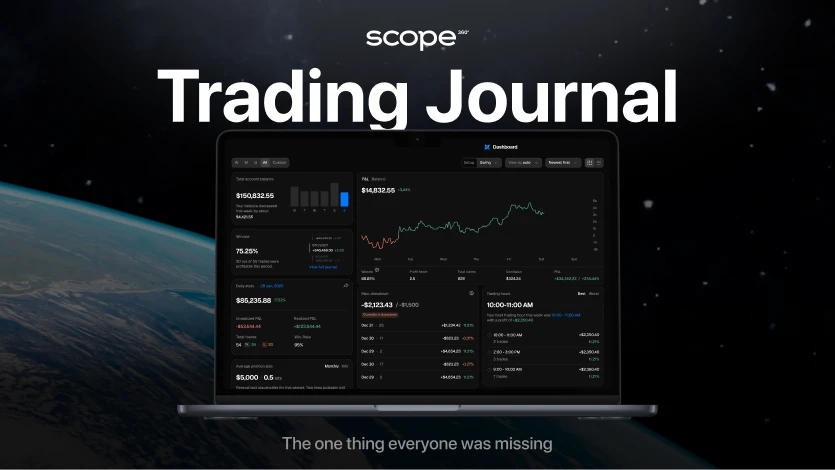
Scope360 is a next-generation professional trading journal designed for traders who view analysis as an integral part of the trading process. The platform brings together automated trade management, statistics, psychological tags and analytical tools in a single space.
Connecting Scope360 to Claude via MCP means one thing: you can now ask your journal questions via Claude and receive answers that take into account all the accumulated context. Want to know your average risk-reward ratio on shares for the last quarter? Or understand why your win rate dropped in February? Just ask, and Claude will retrieve the data, calculate it and explain.
The Scope360 MCP connector turns Claude into your personal trading analyst, who knows every single one of your trades and is ready to discuss them at any time. And most importantly, he has access to the most objective information available — your actual trading data.
How to connect Scope360 to Claude: a step-by-step guide
A few steps to help you start analysing your trading data via Claude.
Step 1. Go to Claude
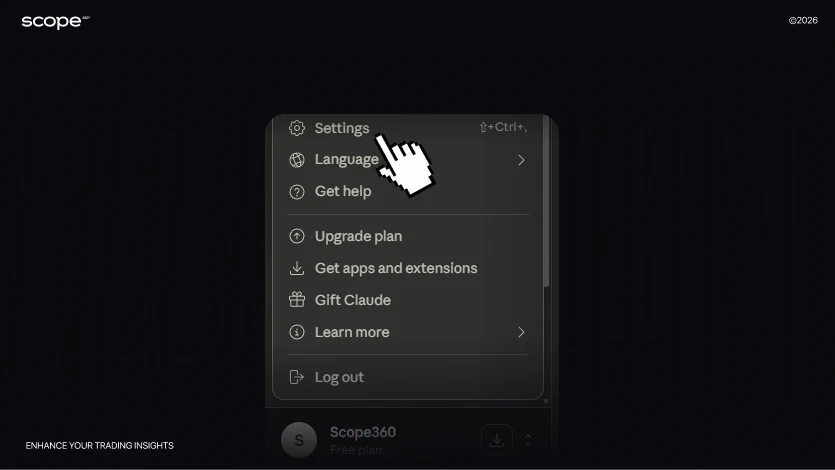
→ Click Settings → Connectors. Then click the Add custom connector button.
— Enter the name: Scope360°.
— In the Remote MCP server URL field, enter: https://ai-mcp.scope360.io/ !!!
— Click Add.
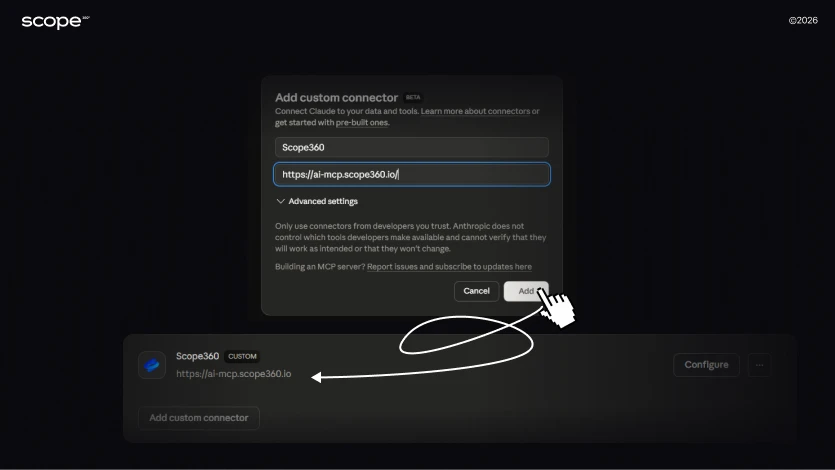
Step 2. A line will appear showing the connected Scope360°.
— Click Configure and check that Needs Approval* is selected.
*A security measure applied by Claude to your Scope account, which enhances the security of the Claude + Scope integration.
Step 3. Go to Scope360°:
— Click Settings → Account and Billing → My profile.
— Look for the External auth field → click Manage credentials.
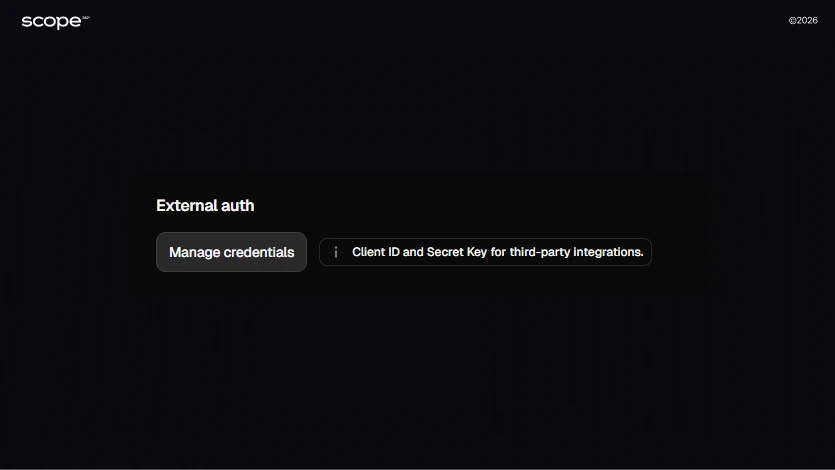
— Copy the Client ID and Secret Key that appear.
Step 4. Return to Claude:
You can now make any query you need, even by entering a simple prompt, marked with Scope360!, so that Claude understands where to fetch the data from.
For example: Analyse my transactions using Scope360 and list the mistakes I’m making.Use Client ID [Your Client ID from Scope] and Secret Key [Your Secret Key]*.
*For the first request (and possibly some subsequent ones), it is important to specify the Client ID and Secret Key from Scope360° so that the chatbot correctly understands the task and the source of information.
Step 5. You will then receive a full response to your request from Claude.
You can make any requests relating to your Scope account.
Practical benefits: what you get right now
1. Instant loss analysis
Ask Claude: “Why did I lose the most in March?” — and receive an analysis with specific trades, dates and patterns.
2. Objective strategy assessment
Ask for an assessment of your strategy based on your journal data. Claude will look at the figures dispassionately and tell you straight: where the strategy works, and where it loses effectiveness.
3. Comparative statistics
“Compare my results on BTC and ETH futures” — Claude will load both data sets, calculate the metrics and provide a comparison.
4. Identifying psychological pitfalls
“When do I trade worst — after a winning streak or after a losing streak?” Claude will find patterns in your notes and records.
Reports in language you can understand
Ask Claude to generate a weekly report based on your data. A ready-made text with conclusions — in a matter of seconds.
5. Personalised training
Based on your actual trades, Claude can suggest specific exercises to correct mistakes — not general advice, but personalised improvements.
Start working with data in a new way
Sign up to Scope360, get a 30-day free trial, connect the MCP connector and try asking Claude your first question about your trades — free of charge and with no restrictions.
Improve your performance with Scope360