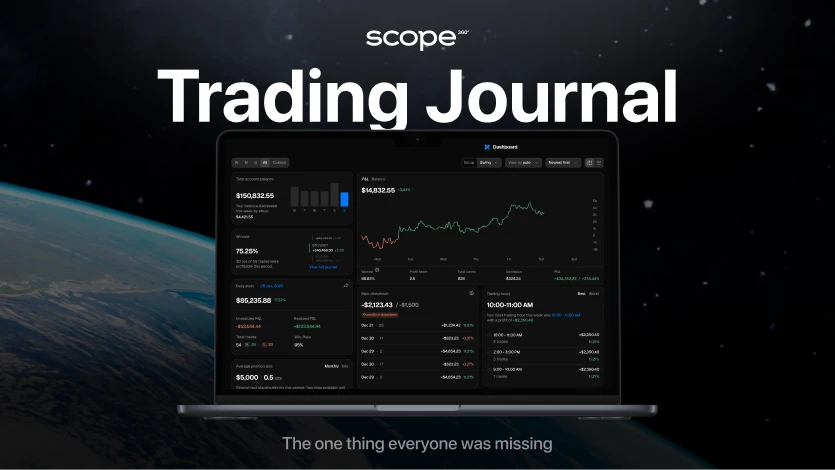
Looking for a powerful way to track and analyze your trades on OKX without wasting hours on spreadsheets?Scope360° is the all-in-one trading journal that turns your OKX trading history into clear analytics, visual reports, and actionable insights - fully automated through a secure API connection.
Connect your OKX account once, and every trade - from entry to exit - appears in your journal automatically. You’ll instantly see:
which setups bring consistent profits,
where your strategy underperforms,
what causes drawdowns and emotional mistakes,
how your results evolve over time.
Scope360° captures every key trade parameter - price, time, instrument, fees, and outcome - and displays it in a clean, intuitive dashboard.Your analytics become structured, data-driven, and objective - so you can focus on execution and growth instead of paperwork.
For disciplined traders who want a real edge on OKX, Scope360° is the most complete and reliable trading journal available today.
How to Connect Your OKX Account to Scope360°
Part 1: Creating an API Key on OKX
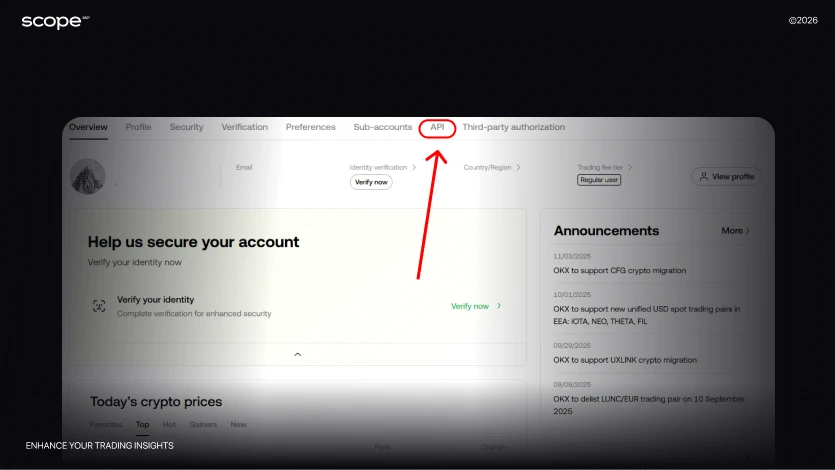
Step 1: Open the API section
Log in to your OKX account. In the top-right corner click your profile icon and select API from the dropdown menu.
Step 2: Start creating a key
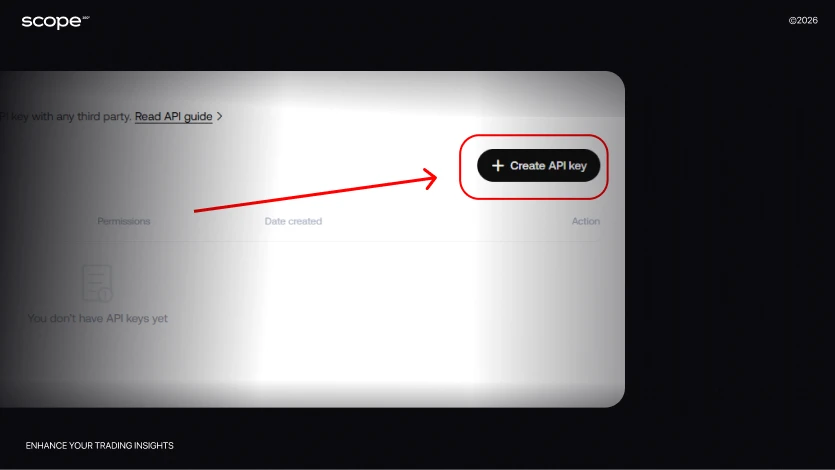
On the page that opens, click Create API key. You’ll be asked to fill in the parameters for your new key.
Step 3: Configure the key parameters
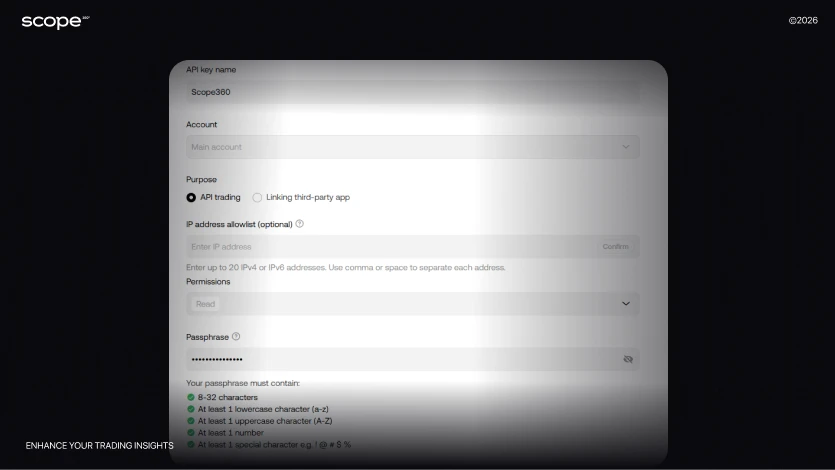
In the Name field, enter any convenient name so you can easily distinguish your keys.
Leave the Account field unchanged.
In the Purpose section, select API trading. This gives access only to your account data.IP address allowlist (optional) - this setting is optional. You may leave it empty.
In the Permissions field, be sure to select Read Only. Your funds remain completely safe - data viewing only, no trading actions.Enter a Passphrase - this is your personal password that adds an extra layer of security (store it carefully, the key won’t work without it).
Complete the setup and confirm the action using 2FA (Google Authenticator/SMS) and email.
Step 4: Save your data
Once the key is created, the system will display:
API Key
Secret Key
Passphrase (your API password)
Store all three values in a secure place - you cannot recover the Secret Key or Passphrase if you lose them.
Part 2: Connecting the API to Scope360°
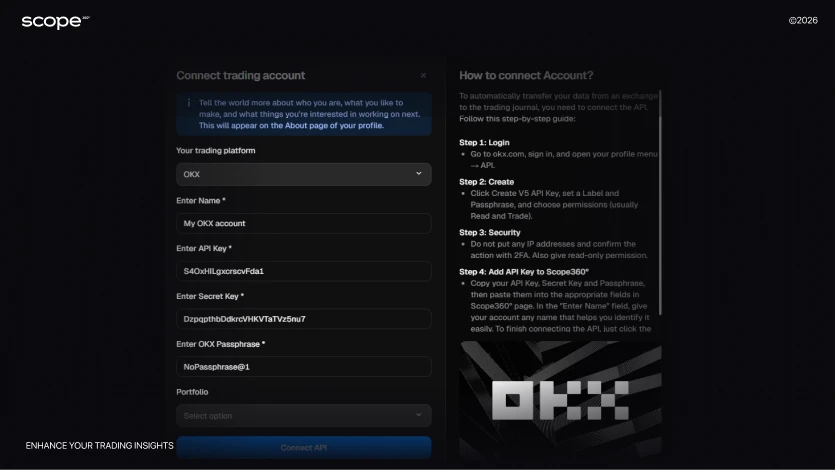
Step 1: Open the account connection section
In Scope360°, click No API Connection → Connect new → API in the top-right corner.
Then select OKX as the data source.
Step 2: Create a clear account name
Enter any name for your trading account.
This is especially useful if you plan to connect several accounts and analyze each type of trading separately.
Step 3: Enter your keys
API Key - copy it from your OKX account
Secret Key - copy it from your OKX account
Passphrase - the password you created during key setup
Important: OKX requires all three fields to be filled in.
Step 4: (Optional) Create a portfolio to group accounts
If you have multiple trading accounts with different goals, use the portfolio feature in Scope360°. You can:
Separate investment accounts from short-term trading accounts
Track statistics for each category independently
View the overall performance of your entire portfolio
Analyze which trading directions generate the most profit
This feature is optional but very helpful for traders who use multiple strategies or trade across different instruments.
Step 5: Wait for synchronization
Click Connect API and wait for the sync to complete.Depending on your trading history, this may take:
From a few minutes up to 15 minutes
Once syncing is complete, all your data will be imported and ready for analysis. You’ll see your full trade history, statistics and performance charts.
Why Scope360° Is the Best Choice for OKX Traders
If you trade on OKX and want to clearly see your real progress, Scope360° is built for you. It’s not just a trade journal - it’s a full analytics system that turns your trading history into clear statistics, reports, and insights.
Automatic import via API - connect your OKX account once, and all your trades automatically sync to your journal. No spreadsheets, no manual entry, no missing data.
50+ performance metrics - Scope360° tracks win rate, drawdown, risk/reward, execution quality, and recurring mistakes, helping you spot strengths and weaknesses in your strategy.
Deep trade context - price, volume, instrument, tags, notes, and even your emotions at the time of entry - all stored in one place.
Custom dashboards & analytics - filter trades by strategy, instrument, or session, build your own reports, and track your growth over time.
Weekly & monthly summaries - automated reports show what’s working, where you lose focus, and which periods deliver the best performance.
Trading calendar & daily stats - visually track your trading activity, overtrading streaks, and consolidation phases.
Mobile app (iOS & Android) - analyze trades on the go with instant synchronization across devices.
Portfolios for multiple strategies - group accounts or trading styles to evaluate profitability across different directions.
Scope360° helps you not just record trades, but truly understand the patterns that drive your profitability.
Interactive dashboard - all trading activity visualized in real time, giving you a clear picture of performance.
Emotional tracking & tagging - log emotions and notes for every trade to see how your mindset impacts results.
Strategy breakdowns - compare different trading approaches and find which ones consistently deliver profits.
Exportable reports - download clean, detailed reports for investors, mentors, or personal review.
Public & private trade pages - share verified performance with your community or keep it private for internal use.
AI insights (coming soon) - intelligent trade analysis that reveals hidden patterns and behavioral mistakes.
Scope360° transforms your OKX trading experience into a system of clarity, structure, and consistent improvement - from every single trade to your complete trading process.
Start Trading Smarter with Scope360° + OKX
Take your OKX trading to the next level with Scope360° - the journal that turns raw data into meaningful insights. Every trade is tracked, analyzed, and visualized automatically so you can focus on execution - not on spreadsheets.
With Scope360°, you get:
Automated trade tracking - connect OKX once via API and watch your performance stats update in real time.
Smart performance analytics - find what drives your best trades, spot mistakes early, and refine your strategy.
Real data transparency - every number, fee, and result matches your actual OKX history.
Start your free trial today and experience how Scope360° helps you trade with more structure, awareness, and confidence.